
My first Digital Carnet journey: lessons learned travelling from Bristol to Paris



On 1 June 2026, Digital eATA Carnets officially launched across the UK, European Union, Switzerland and Norway, marking a significant milestone for international trade. A Carnet (pronounced car-nay) is an international customs document that acts as a passport for goods.
As Head of International Trade Services at Business West, I was keen to experience the process first-hand. So, when I travelled from Bristol to Paris hand-carrying professional equipment for a presentation at the International Chamber of Commerce, I used a Digital Carnet for the entire journey (the first in the UK).
Watch my Digital Carnet journey
While Digital Carnets represent a major step forward in the digitalisation of trade and temporary export, one of my biggest takeaways is that preparation remains just as important as it is with a paper Carnet.
The good news? The Digital Carnet itself was straightforward to use. The biggest challenges wasn't the technology, but understanding where Customs was located and building enough time into the journey.
My top tips for using a Digital Carnet
- Contact Border Force before you travel
If you're travelling through an airport, let Border Force know you're coming. This can help ensure the appropriate officers are available and avoid unnecessary delays. - Allow more time than you think you'll need
I would recommend allowing at least an extra hour. Finding Customs offices, navigating unfamiliar terminals and completing Digital Carnet validations can take longer than expected. - Prepare your travel declarations before you leave
Complete your travel declarations in the Digital Carnet app before arriving at the airport. WiFi and mobile signals can be unreliable, and it's much easier to resolve any issues before you travel. - If flying, add your flight number to the Digital Carnet
You can do this when you are preparing your travels. There is an ‘Extra Details’ box. Add it in this box.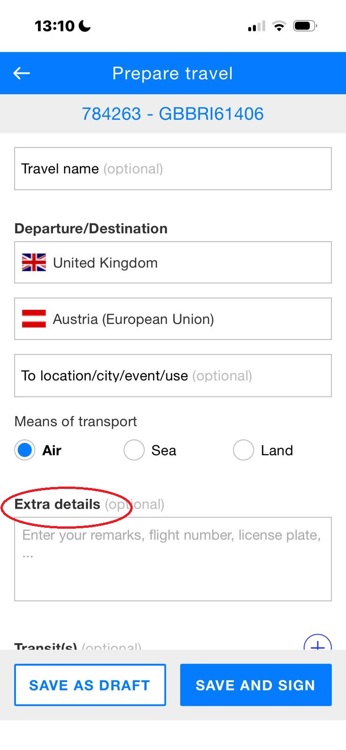
- Visit Customs before checking in
If you're hand-carrying goods, make sure you visit Border Force before checking in for your flight. This is an essential part of the process and shouldn't be left until the last minute. - Be prepared to show your goods
Customs officers may wish to inspect the goods listed on your Digital Carnet. In my case, Border Force checked the serial number on my laptop against the information recorded on the Carnet. - Head to the Red Channel when you arrive
When you land, make your way to the Red Channel ("Goods to Declare") to have your Digital Carnet validated. Be aware that Customs offices may not always be located where you expect them to be, and you may be directed elsewhere.
Handy tip: If you find there is no one around when you arrive in Customs and there’s a red phone – ring the red phone! This phone will get you in contact with Border Force.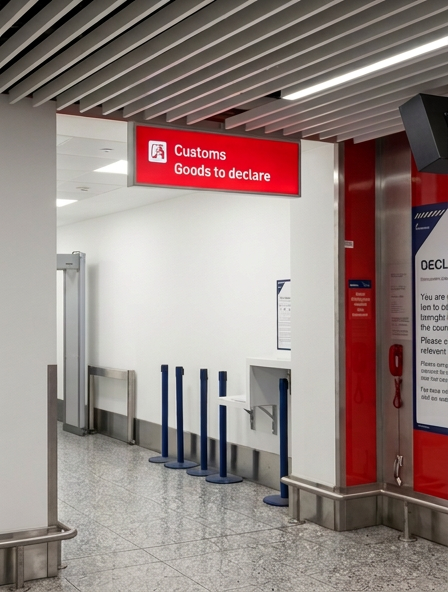
- Remember: Customs may not be where you expect them to be!
When you arrive, the commercial Customs office might not be in the terminal you land in. I had to walk from terminal 2a to 2e to find the customs office.
And when leaving a country, one lesson that surprised me was that you may need to return to the Arrivals area to obtain your re-export validation before heading back to Departures. It feels counterintuitive, but knowing this in advance can save valuable time and stress. - Ask questions
It’s a good idea to check with Border Force when getting your importation counterfoil validated, which Customs office you need to attend when leaving, in case it’s at a different terminal. Airports often have multiple terminals and Customs offices, and a quick question can save a lot of confusion later. - Keep travel arrangements flexible
If you're arranging transfers, avoid booking taxis/transfers too tightly around your arrival time. Customs processing times can vary, particularly while Digital Carnets bed in across different airports.
Digital Carnets: different format, same principles
One of the most reassuring aspects of my journey was that, despite the new technology, the underlying process remains familiar.
In many ways, a Digital Carnet is simply a traditional Carnet hosted within an app. The same Customs checks still take place, and the same care is required when moving goods across borders. The difference is that declarations are presented digitally using QR codes rather than paper documents.
To help businesses understand what to expect, I've documented my journey from Bristol to Paris and back again, including the practical realities of finding Customs, presenting declarations and navigating the process in real time.
If your business regularly moves goods temporarily for exhibitions, trade shows, events or professional projects, I hope these insights help you prepare for your own Digital Carnet journey.
Our expert Carnet team has been helping businesses prepare for the transition to Digital Carnets for many months and remains on hand to support companies through this next chapter in international trade.